ADC 2026 Evaluation and Certificate Instructions
How to Complete Evaluations and Access CE Certificates
Annual Dialysis Conference 2026
To receive Continuing Education (CE) credit for sessions attended, please follow the steps below in Canvas.
Step 1: Enroll in the Conference Course
Visit the Annual Dialysis Conference 2026 course in Canvas:
https://umsystem.instructure.com/courses/407869
If you are not already enrolled:
- Click Enroll in Course.
- Follow the prompts to complete enrollment.
If this is your first time using Canvas:
- You may be prompted to create a Canvas login.
- If you already have a Canvas account, please feel free to use that login, or log in using the email address you used to register for the conference.
- If you do not have a University of Missouri System (UM System) login, choose “Other” or “Alternative Login” when prompted and follow the instructions to create a Canvas account.
- Please save and remember your Canvas login email and password, as you will use this same login to return to the course and access your CE certificates.
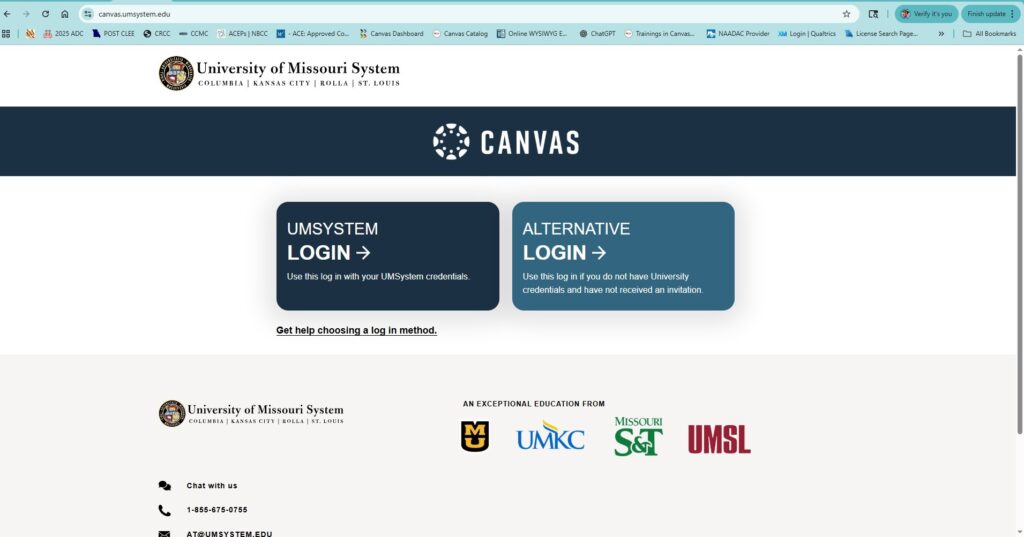
Important:
After creating your Canvas account, you may be taken to your Canvas dashboard instead of the conference course. If this happens, simply return to the conference course using the link below and enroll if needed:
Annual Dialysis Conference 2026 Course Link:
https://umsystem.instructure.com/courses/407869
Step 2: Open the Course
After enrolling:
- Click Go to Course, Start Course, or Open Course if prompted.
If you do not see this option:
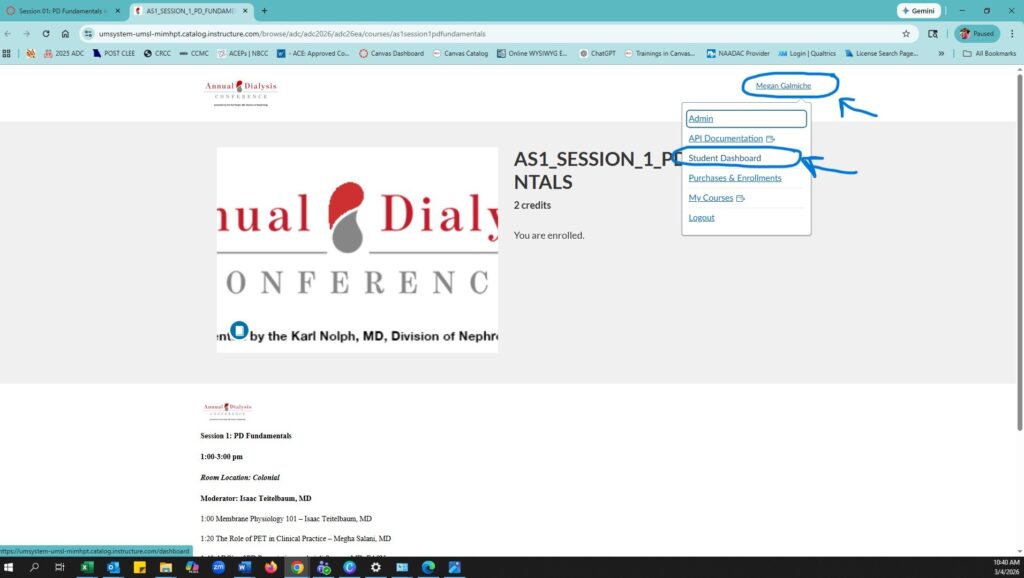
- Look in the upper right-hand corner of the page for your name displayed in blue.
- Click your name to open the Canvas Dashboard.
- On the Dashboard, locate and select Annual Dialysis Conference 2026 from your list of courses.
This course serves as the main hub for all conference evaluations and session links.
Step 3: Complete the Overall Conference Evaluation
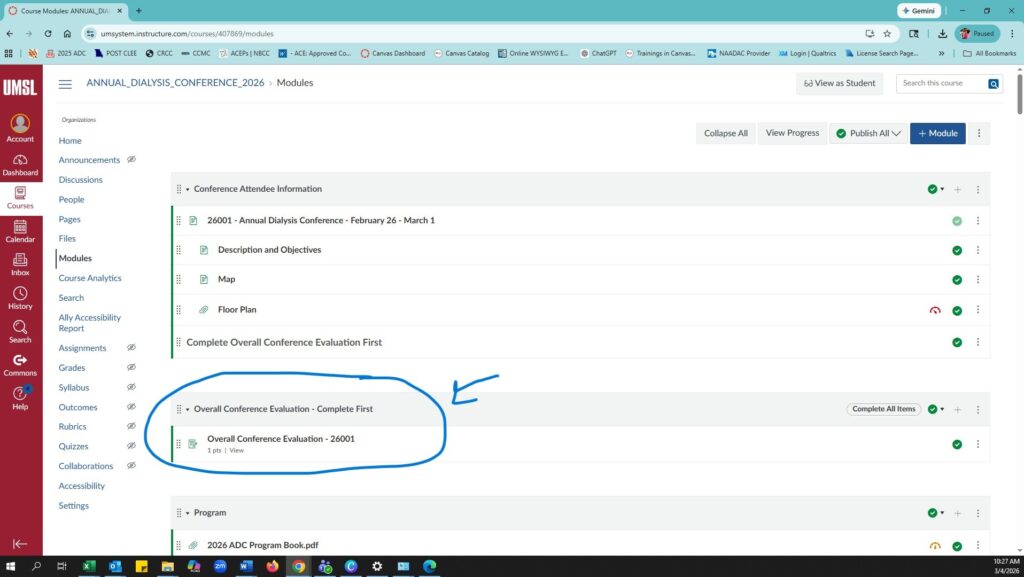
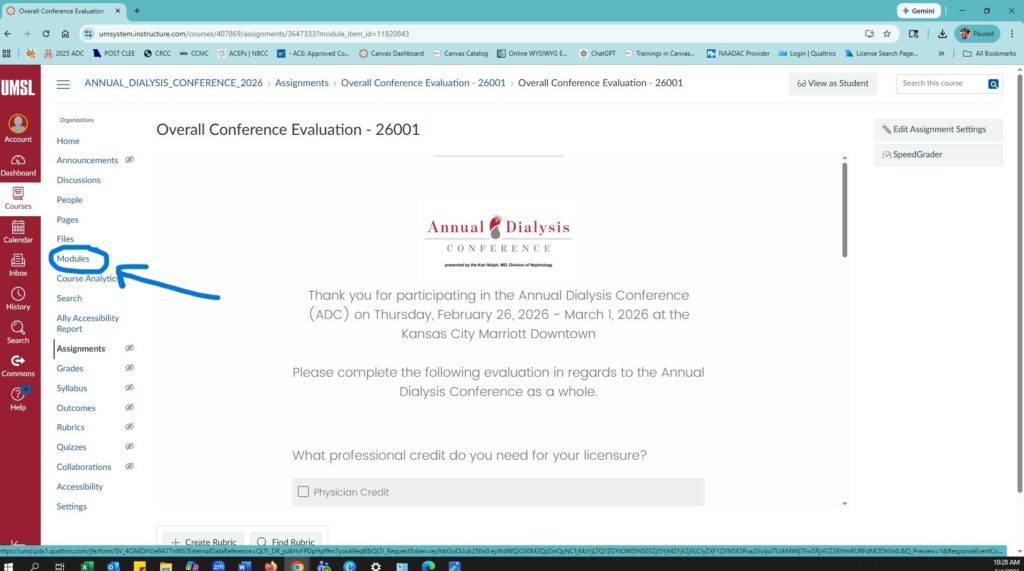
Before accessing individual session evaluations, you must first complete the Overall Conference Evaluation.
- In the Annual Dialysis Conference 2026 course, locate the Overall Conference Evaluation module.
- Complete and submit the evaluation.
Once submitted, the individual session links will unlock.
Step 4: Select the Session You Attended
After completing the overall evaluation:
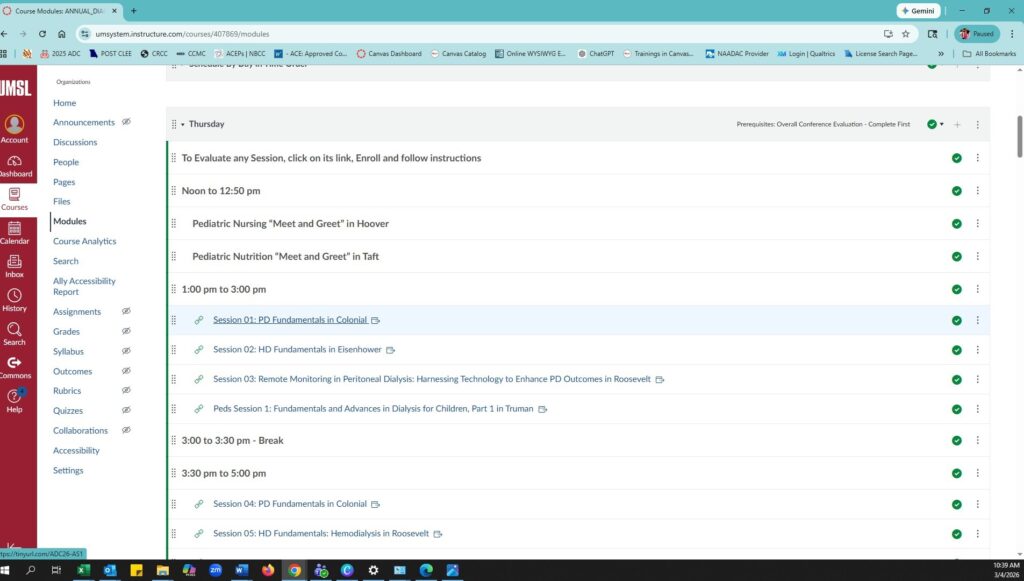
- Click on Modules to access the rest of the conference sessions.
- In the Annual Dialysis Conference 2026 course, click the session link for the presentation you attended and would like CE credit for.
- This link will open a separate Canvas course for that specific session.
Step 5: Complete the Session Evaluation
Inside the session course:
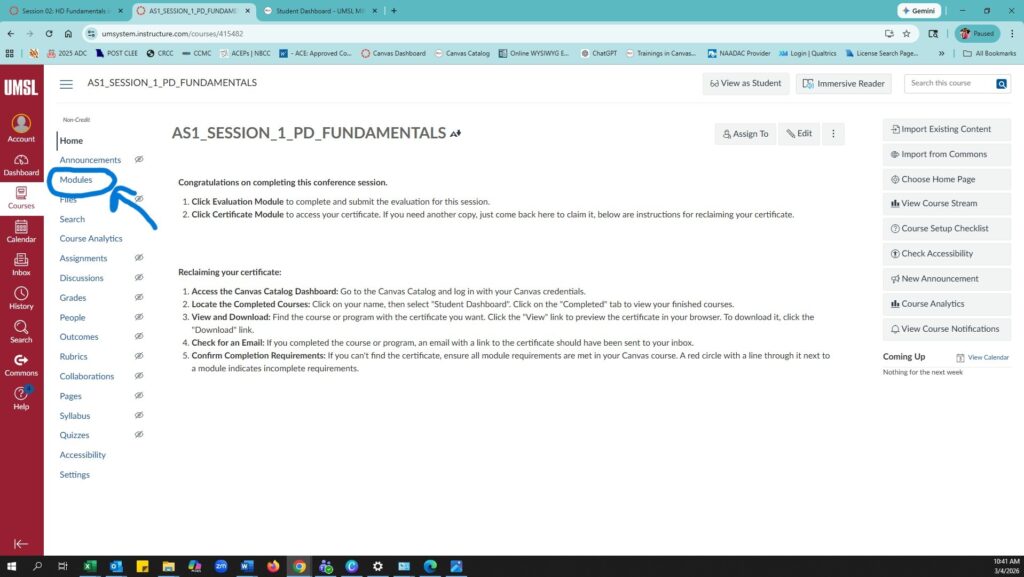
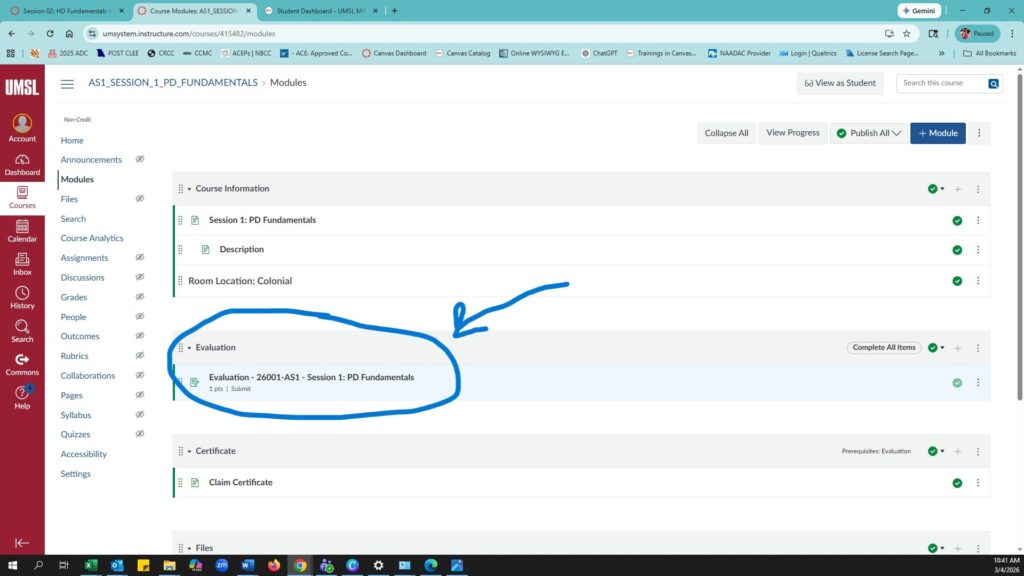
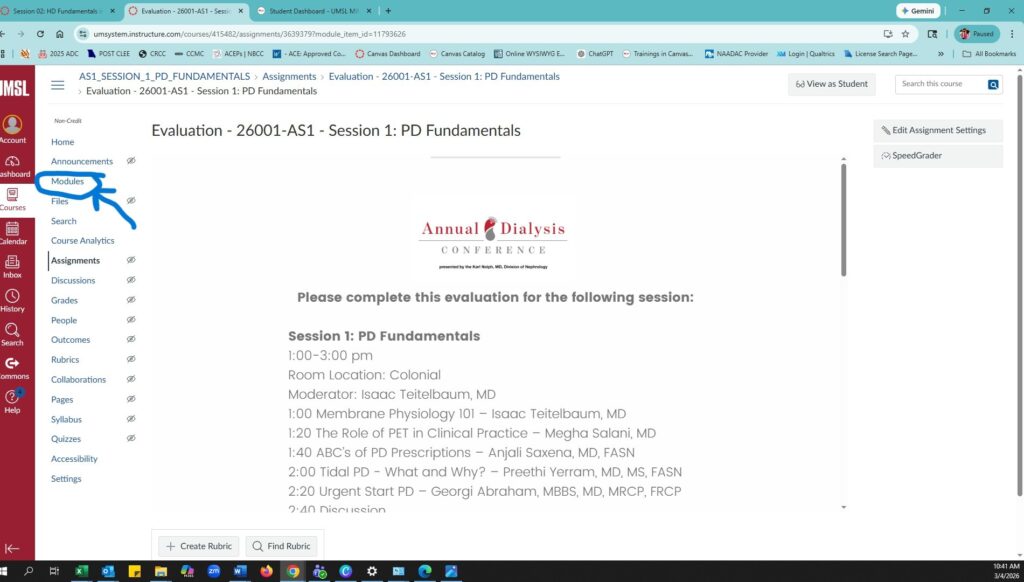
- Click the Session Evaluation module.
- Complete and submit the evaluation.
- After submitting the session evaluation, click on Modules to access the Certificate Module.
Step 6: Generate Your CE Certificate
After submitting the session evaluation:
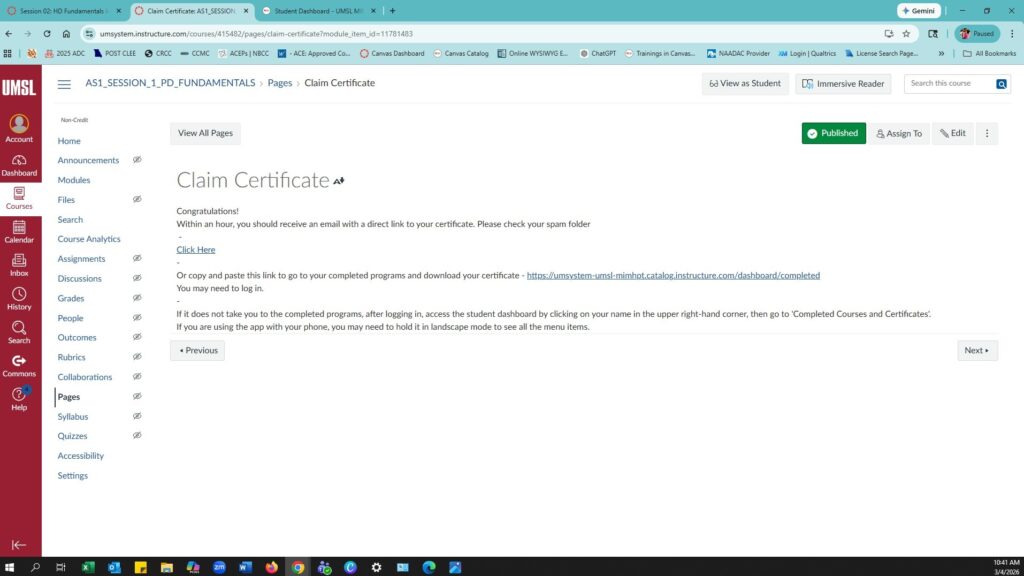
- Click the Certificate Module.
- Follow the instructions to generate and download your CE certificate.
Step 7: Repeat for Additional Sessions
To receive credit for additional sessions:
- Return to the Annual Dialysis Conference 2026 course.
- Click the next session link.
- Complete the session evaluation and certificate module for that session.
Step 8: Download or Reclaim Your Certificates Later
You may return to Canvas at any time to access your certificates.
- Log in to Canvas using the same email and password you used to create your account.
- Go to your Student Dashboard.
- Select Completed Courses.
- Your CE certificates can be downloaded from this page.
If your certificate is not showing up, return to the session course and make sure both of the following have been completed:
- The Session Evaluation
- The Certificate Module
Once both steps are completed, your certificate should become available.
⚠️ Important Notes
- You must enroll in the Annual Dialysis Conference 2026 Canvas course first.
- The Overall Conference Evaluation must be completed before session evaluations unlock.
- Each session has its own evaluation and CE certificate.
- Be sure to return to the Annual Dialysis Conference 2026 course between sessions to access additional evaluations.